







Due to unsafe road conditions for Anchorage and surrounding areas, UAA’s Anchorage campus will be on a delayed start today, Thursday, Dec. 4. Campus will open at 10 a.m. to allow for safer travel.
Accessibility

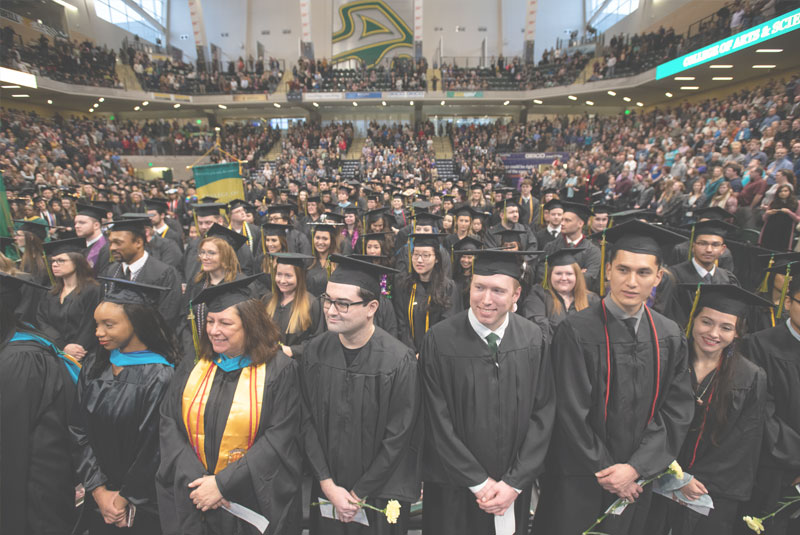
Katherine Irwin, UAA's first Deaf student commencement speaker, delivers her address, Dec. 2018.
UAA's Commitment
At the University of Alaska Anchorage, we are committed to ensuring that all of our students are supported in achieving their academic goals. This is supported by UA’s policy of non-discrimination on the basis of disability, which makes accessibility integral to our educational mission. Additionally, our Accessibility of Instructional Materials Policy addresses specific expectations around accessibility in our courses. We recommend using the Universal Design approach below to develop accessible courses. These resources will help instructors design and teach accessible online, hybrid, and technology-enhanced courses.
Students who experience disabilities and need academic accommodations should reach
out to the Disability Support Services (DSS) office. Faculty and staff who experience disabilities should work with Human Resources for support and accommodations.
Learn More About Accessibility
Legislation
Key federal legislation related to accessibility includes the following:
- The Rehabilitation Act passed in 1973 made it unlawful to discriminate against persons with disabilities in all federally assisted programs, services, and employment.
- Section 504 of the Rehabilitation Act stipulates that "no qualified individual with a disability in the United States shall be excluded from, denied the benefits of, or be subjected to discrimination under any program or activity that receives federal financial assistance.”
- Section 508 is the 1998 amendment to the Rehabilitation Act that mandates that electronic and information technology supported by federal agencies must be accessible to people with disabilities. In January 2018, updates to Section 508 went into place requiring conformance to Web Content Accessibility Guidelines (WCAG) 2.0’s Level A and AA Success Criteria for most Section 508-covered information and communication technology.
- The Americans with Disabilities Act (ADA) is civil rights legislation signed in 1990 to prohibit discrimination based on a student’s disability. The ADA Amendments Act of 2008 clarifies the definition of “disability” and broadens the number of individuals who are eligible for the protections of the ADA, including accommodations for temporary disabilities. In 2024, updated regulations for the ADA were published regarding accessibility of web content and mobile apps. This requires conformance to WCAG 2.1’s Level A and AA Success Criteria for most web content and mobile app with a compliance date of April 24, 2026.
Definitions
- Disability: A physical or mental impairment that substantially limits one or more major life activities.
- Accessibility: All students can access, perceive, understand, navigate, interact, and contribute to web-based or technology-enhanced courses and materials.
- Accommodation: Necessary and appropriate modifications to ensure that individuals with disabilities have access to course materials and functions.
- Assistive Technology: Any equipment that is used to enhance the functional capabilities of students with disabilities.
- Universal Design: Proactive design of products and environments to be usable by all people, to the greatest extent possible, without the need for adaptation or specialized design.
Overview: What Does This Mean for Instructors?
Accessibility is the process of removing barriers to learning. It includes:
- Textbooks and materials with electronic formats that let students use screen readers
- Captioned videos so that people who are D/deaf or hard of hearing know what’s being said
- Alt-text and descriptive captions so students using screen readers can learn from images
- Clear document structures and plain-language written directions for students with cognitive disabilities or those using a screen reader
- Websites that can be navigated with a keyboard, for those who primarily use something other than a computer mouse to navigate
Accessibility covers the default requirements to give everyone access. Accommodations help an individual use that access; they are typically added when someone is unable to access what most other people can.
Universal Design for Learning supports students with a wide variety of backgrounds, abilities, barriers, and motivators. To make your course more universally accessible, give learners various ways to:
- Get motivated and engage with your course
- Acquire information and knowledge
- Show what they know (e.g., a choice of assignments or assessments)
Learn more about how to make your course accessible by exploring the guides in the Resources tab.
Standards and Guidelines
In alignment with UAA’s efforts toward equal access and equal opportunity for all, along with the newly updated legal standards of the ADA, and Sections 504 and 508 of the Rehabilitation Act, by April 24, 2026, UAA courses should meet the Web Content Accessibility Guidelines (WCAG) 2.1’s Level A and AA Success Criteria.
UAA courses will be inclusive and user-friendly, developed and maintained using the principles of Universal Design. They will be developed to meet the Quality Matters Specific Standard 7.2 and General Standard 8 that together address accessibility.
UAA's Faculty Success office addresses these topics regularly in our training and professional development efforts. We also regularly facilitate Quality Matters workshops, which will also give faculty an excellent overview of QM’s accessibility-related standards.
- Web Content Accessibility Guidelines
Web Content Accessibility Guidelines (WCAG)
The W3C, World Wide Web Consortium, develops internationally observed standards for web practices, including accessibility. The Web Content Accessibility Guidelines (WCAG) are the principal guidelines that UAA must follow for web-based content, including course content.
- Quality Matters Standards
Quality Matters Standards
UAA is a member of Quality Matters, which offers a process to improve and certify the design of online and blended courses. Faculty Success can provide any UAA faculty member with a complete set of the QM Standards to use in your course design and development efforts.
Standard 7.2 ensures that students can readily find accessibility resources in a course through instructions that articulate or link to the institution’s accessibility policies and accommodation services. General Standard 8 addresses a variety of accessibility-related facets of course design and content including navigation, ease of use, readability, accessible text, images, files, documents, and multimedia content, and accessibility statements for all technologies used in the course.
Resources and Guides
- Accessibility Basics at UAA
Accessibility Basics at UAA
- Accessibility at UAA Video Playlists: These playlists include short topic-focused videos, full recordings and clips from trainings and workshops, walkthroughs of checkers and tools, and other videos on specific topics and platforms.
- Make Your Content Accessible (Asynchronous Training): Faculty Success is hosting week-long, asynchronous accessibility training throughout the semester. This training will help you learn basic accessibility skills, evaluate your content for accessibility, and identify and fix inaccessible content in your course. Register now to Make Your Content Accessible!
- Accessibility Afternoons (Virtual Workshops): Join the UAA Instructional Design team monthly for a half-hour, topic-focused virtual workshop on making your content accessible. Register for Accessibility Afternoons to be added to a calendar event, receive the recordings after the fact, and submit any questions you have on the topic. For information about past recordings and future session topics, refer to the Accessibility Afternoons Info document
- Accessibility Trail Guide (interactive training module) and Trail Guide text-only version
- UAA Accessibility Quick Guide (Google Doc)
- KPC Accessibility Quick Start Guide (Google site)
- UAA Accessibility Tools
- Accessible Documents
Make Your Documents Accessible
- Accessibility Checkers
Accessibility Checkers
- Guide for Accessibility Checkers (Google Doc)
- Ally for LMS Help for Instructors
- Microsoft Office Accessibility Checker
- Grackle Accessibility Checker for Google Workspace Overview Video
- Using Foxit PDF Editor Guide
- WAVE from WebAIM: web accessibility evaluation tool
- WebAIM’s Contrast Checker Bookmarklet
- Captioning
- Learn More
Learn More About Accessibility
- Accessibility Checklist, University of Washington
- Accessible U: 7 Core Skills, University of Minnesota
- Creating Accessible Content, Portland Community College
- Linkedin Learning is now available to UAA faculty and staff
- WebAIM Accessibility Resources
- Universal Design for Learning (UDL)
Faculty Success
Library 213 • 907-786-4496 • uaa_facultysuccess@alaska.edu • Monday – Friday, 8 a.m. – 5 p.m.